


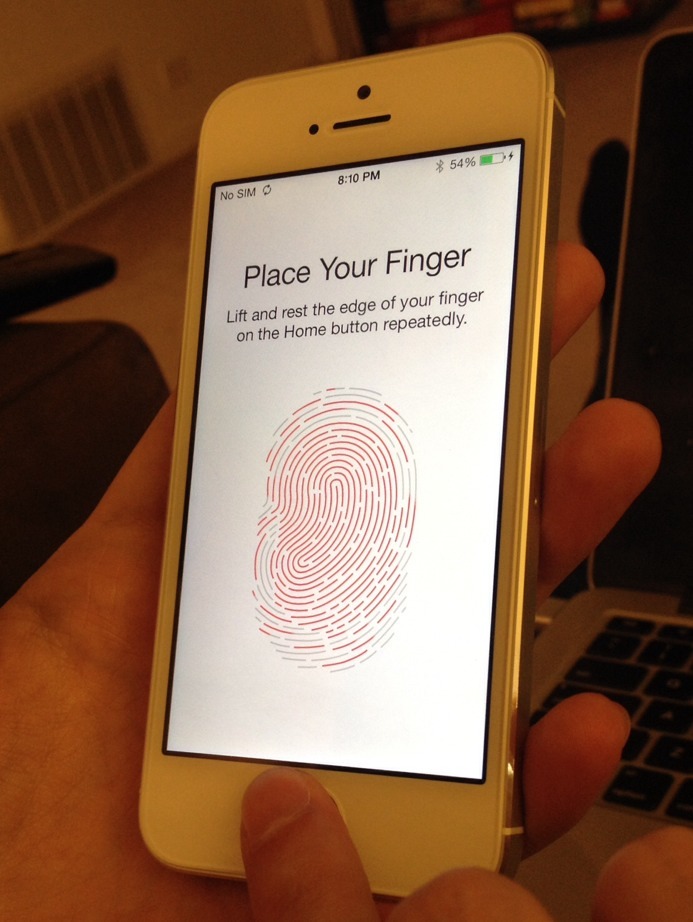


This is sort of a mini first time user experience. The screens above show the process of setting up Touch ID (fingerprint recognition) on an iPhone 5s.
The good bits:
Instead of a manual or read-through, I was prompted to set up Touch ID (with minimal messaging about the feature) and I was provided instructions when I placed my finger on the home button. Visual feedback was in the form of a fingerprint illustration that turned red as it filled in. Vibrations indicated when I need to lift and replace my finger to move on to the next step. This is a good example of leading someone through a setup experience with instructions provided in context.
To be improved:
These screens only show a subset of all the scans needed to capture a full fingerprint. Although some progress is indicated, it’s unclear exactly how much is left to go.
There could also be some clearer next steps after completing Touch ID. For example, users aren’t told how to add more fingers (the option is in Settings > General > Passcode & Fingerprint), which seems like a common use case.